Checking a USB drive's NTFS partition in Linux
Occasionally, the NTFS partition on a USB drive connected to a Keenetic router may fail to mount. In such cases, the System Log will display errors of the following type:
E [Apr 8 14:11:45] ndm: FileSystem::Native: failed to mount "USB-TR-8GB" drive: filesystem is dirty, please perform a chkdsk maintenance of this drive on your Windows computer.
E [Apr 8 14:11:45] ndm: FileSystem::Ext: failed to mount a dirty partition.
This means that the integrity of the NTFS file system has been compromised or the dirty flag / dirty bit has been raised.
It is recommended that you check the file system for errors.
Let’s look at how to check a USB drive's NTFS partition in Linux operating systems.
To check the partition in Linux, you will need to install the ntfs-3g package.
ntfs-3g is an open-source NTFS driver developed by Tuxera. This driver includes the ntfsfix utility, which allows you to check an NTFS partition for errors in Linux systems.
1. Open a terminal and install ntfs-3g:
sudo apt install ntfs-3g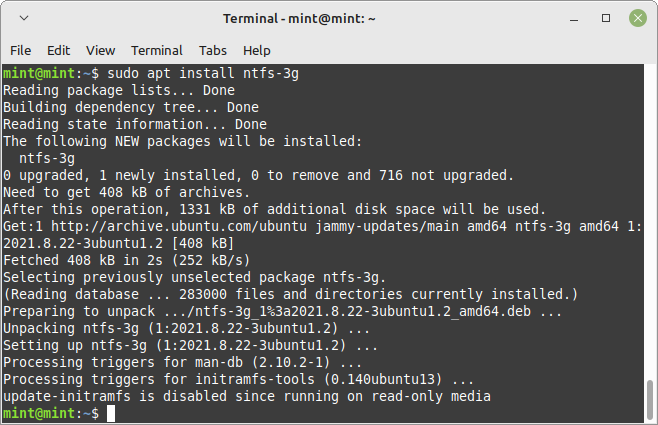
2. Connect the storage device to a computer running Linux
To find the correct partition, run the following command:
sudo fdisk -l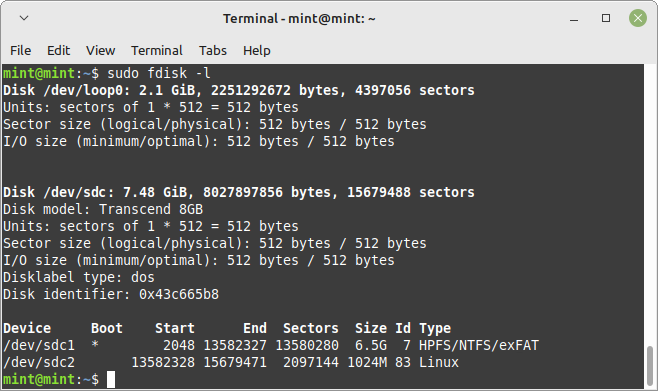
In Linux, devices are numbered alphabetically as sda, sdb, sdc, sdd and so on. Usually, the name sda belongs to the hard drive. As the USB drive is connected last, the partition name may be sdc or sdd. In our example, the required NTFS partition is /dev/sdc1.
3. Unmount the partition. For example:
sudo umount /dev/sdc1Important
Please be careful when selecting the correct partition and when unmounting it. Working with partitions requires extra caution; incorrect actions may affect the entire system's functionality.
4. Check the partition for errors using the ntfsfix command:
sudo ntfsfix -b -d /dev/sdc1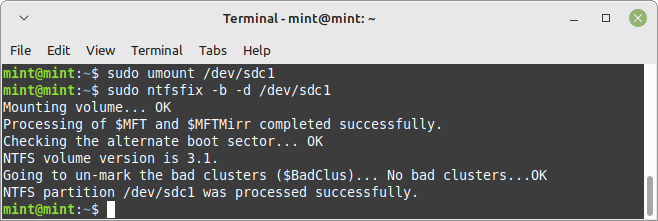
The following options are used during the check:
-b, --clear-bad-sectors Clear the bad sector list
-d, --clear-dirty Clear the volume dirty flag
5. After checking the partition, reconnect the USB drive to your Keenetic router and check the system log to see if the partition with the NTFS file system has loaded correctly:
[I] Apr  8 14:35:06 kernel: usb 1-1: new high-speed USB device number 2 using xhci-mtk
[I] Apr  8 14:35:06 kernel: usb 1-1: New USB device found, idVendor=8564, idProduct=1000, bcdDevice= 1.00
[I] Apr  8 14:35:06 kernel: usb 1-1: New USB device strings: Mfr=1, Product=2, SerialNumber=3
[I] Apr  8 14:35:06 kernel: usb 1-1: Product: Mass Storage Device
[I] Apr  8 14:35:06 kernel: usb 1-1: Manufacturer: JetFlash
[I] Apr  8 14:35:06 kernel: usb 1-1: SerialNumber: 58WU4EVB
[I] Apr  8 14:35:06 kernel: usb-storage 1-1:1.0: USB Mass Storage device detected
[I] Apr  8 14:35:06 kernel: usb-storage 1-1:1.0: Quirks match for vid 8564 pid 1000: 800000
[I] Apr  8 14:35:06 kernel: scsi host0: usb-storage 1-1:1.0
[I] Apr  8 14:35:07 kernel: scsi 0:0:0:0: Direct-Access     JetFlash Transcend 8GB    8.07 PQ: 0 ANSI: 4
[I] Apr  8 14:35:07 kernel: sd 0:0:0:0: Attached scsi generic sg0 type 0
[I] Apr  8 14:35:07 kernel: sd 0:0:0:0: [sda] 15679488 512-byte logical blocks: (8.03 GB/7.48 GiB)
[I] Apr  8 14:35:07 kernel: sd 0:0:0:0: [sda] Write Protect is off
[I] Apr  8 14:35:07 kernel: sd 0:0:0:0: [sda] Mode Sense: 23 00 00 00
[I] Apr  8 14:35:07 kernel: sd 0:0:0:0: [sda] Write cache: disabled, read cache: enabled, doesn't support DPO or FUA
[I] Apr  8 14:35:07 kernel:  sda: sda1 sda2
[I] Apr  8 14:35:07 kernel: sd 0:0:0:0: [sda] Attached SCSI removable disk
[I] Apr  8 14:35:07 ndm: Storage::Manager: "Media0": enabled a disk spin down.
[I] Apr  8 14:35:07 ndm: Storage::Manager: created "Media0", port 1.

[I] Apr  8 14:35:07 ndm: Storage::Partition: ntfs "5ABAA070BAA04A79:": filesystem initialized.
[I] Apr  8 14:35:07 kernel: tntfs info (device sda1, pid 14790): ntfs_fill_super(): fail_safe is enabled.
[I] Apr  8 14:35:07 kernel: usb 1-1: usbfs: USBDEVFS_CONTROL failed cmd ndm rqt 128 rq 6 len 2 ret -71
[I] Apr  8 14:35:07 kernel: tntfs info (device sda1, pid 14790): load_system_files(): NTFS volume name 'USB-TR-8GB', version 3.1 (cluster_size 4096, PAGE_SIZE 4096).
[I] Apr  8 14:35:07 ndm: Storage::Manager: "Media0": registered partition "5ABAA070BAA04A79:".
In our example, the last five entries in the router log show that the NTFS partition on the USB drive has been successfully mounted.