IPv6 pinholing
Starting with KeeneticOS 5.0, Keenetic routers support the IPv6 pinholing mechanism, which allows opening TCP and UDP ports to provide external access from the Internet to home network clients using IPv6 addresses.
Important
Be careful when using IPv6 pinholing, as the IPv6 protocol concept does not assume NAT, which leads to reduced security. IPv6 pinholing must be configured with great care, taking security issues into account.
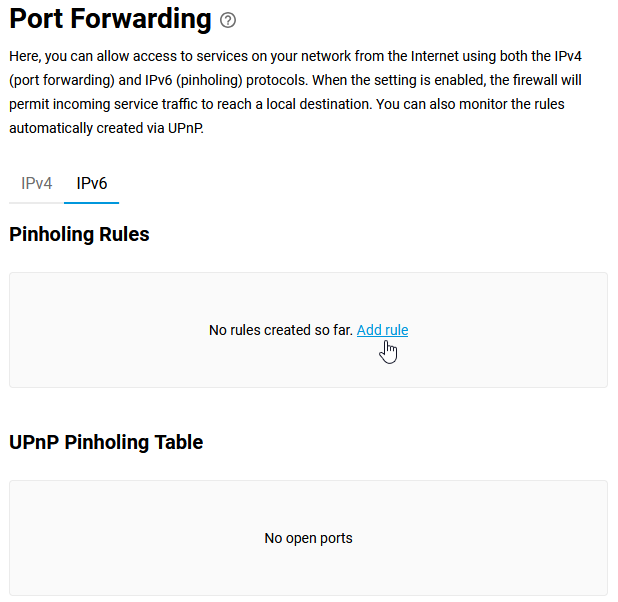
The setting is available in the web interface on the Port Forwarding page.
Go to the IPv6 tab and click Add rule in the Pinholing Rules section.
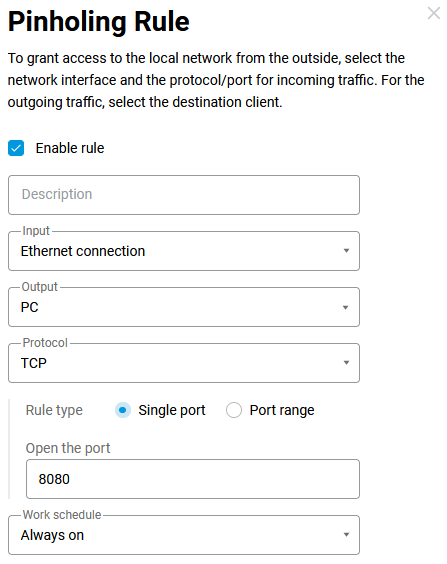
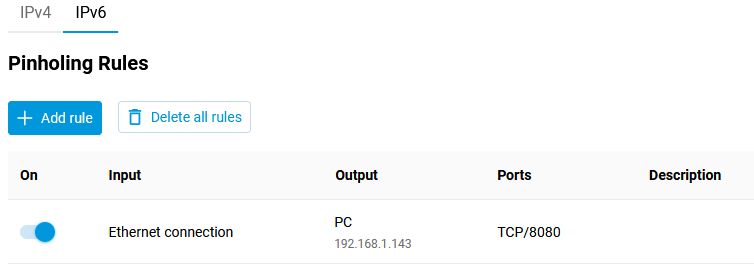
In the Pinholing Rule window that opens, enable the rule, select the external WAN interface in the Input field (in our example, this interface is named Ethernet connection), and select the client to which the redirection will be performed in the Output field (in our example, this is the host named PC). In the Output field, you can only select hosts; you cannot specify an IPv6 address manually. In the Protocol field, you can specify a protocol from the list of pre-installed protocols that will be used for redirection. If you select TCP or UDP, you can manually specify the port number or port range (in our example, the TCP protocol is used, and the web service port 8080 is specified in the Open the port field).
In the Work schedule field, you can set a schedule for when this rule applies.