Link aggregation
Keenetic Titan (KN-1811) comes with the link aggregation feature. It allows you to combine two ports on the router's built-in switch into a single link, increasing the connection throughput and fault tolerance in a multi-user environment. For example, link aggregation can be used when connecting to a NAS with two Gigabit Ethernet ports and that supports it.
The switch uses a Linux bonding driver in XOR (balance-xor) mode for link aggregation. Traffic is allocated across the group using Load Balancing XOR L3+L4 ip addr+port. This mode provides load balancing and fault tolerance.
Port aggregation configuration is available in the router's web interface on the General System Settings page in the Network Ports section.
Aggregation port numbers may vary depending on the model.
For example, with Titan (KN-1811/1812) and Hopper 4G+ (KN-2312) you can enable channel aggregation for ports 1+2 and 3+4. Peak DSL (KN-2510) uses 5+6 and 7+8 ports for aggregation. Hopper SE (KN-3812), Hopper (KN-3811), Sprinter SE (KN-3712), Sprinter (KN-3711), Hero (KN-1012) use 1+2 ports. Hero 5G (KN-4110) uses 0+1 and 2+3 ports for aggregation.
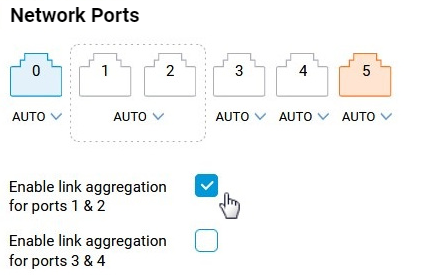
When ports are included in a group, a single setting for speed and duplex applies to the aggregated link.
Aggregation can be used for LAN and WAN connections.
In the Internet menu on the Ethernet Cable Connections to Internet page, the aggregated link can be selected to connect to an ISP.
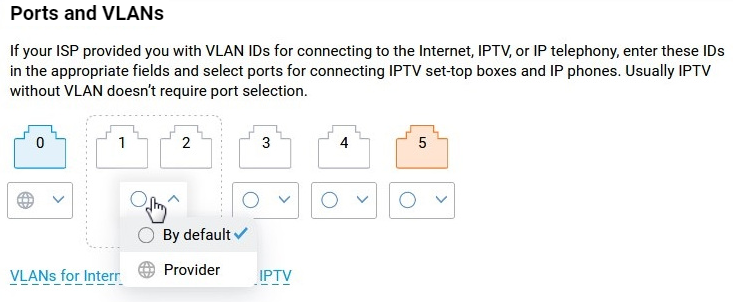
The aggregated port group cannot bridge IPTV or VoIP services (VLAN).
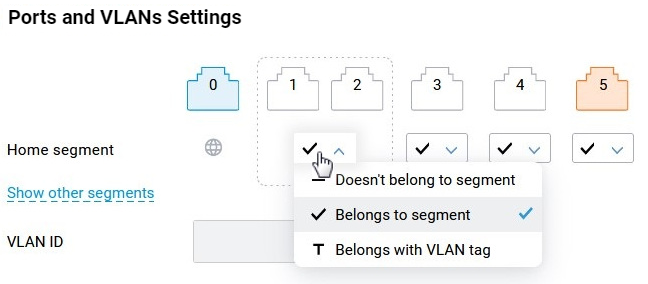
On the My Networks and Wi-Fi page, segment belonging settings are available.
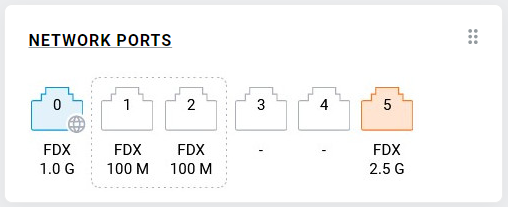
In the System Dashboard under the Network Ports section, the enabled aggregated group will be highlighted with a dotted frame.