rTorrent OPKG paketinin kurulumu ve yapılandırılması
rTorrent, libTorrent kütüphanelerine dayalı, Linux için bir C++ BitTorrent istemcisidir. Hafif ve sistem kaynaklarını az kullanan bir BitTorrent istemcisidir.
Bu bölümde, torrent istemcisi rTorrent'in Entware deposundan kurulumunu ele alacağız.
Öncelikle harici bir USB sürücü hazırlamanız ve üzerine Entware depo paket sistemini kurmanız gerekir. Bunun nasıl yapılacağı USB Sürücülerde EXT4 Dosya Sisteminin Kullanımı makalesinde gösterilmektedir.
rtorrent-easy-install paketini kurun.
opkg install rtorrent-easy-installkomutunu çalıştırın:/ #
opkg install rtorrent-easy-installInstalling rtorrent-easy-install (0.2-3a) to root... Downloading http://bin.entware.net/mipselsf-k3.4/rtorrent-easy-install_0.2-3a_mipsel-3.4.ipk Installing rutorrent-plugin-rpc (3.8-1) to root... Downloading http://bin.entware.net/mipselsf-k3.4/rutorrent-plugin-rpc_3.8-1_mipsel-3.4.ipk Installing rutorrent (3.8-1) to root... Downloading http://bin.entware.net/mipselsf-k3.4/rutorrent_3.8-1_mipsel-3.4.ipk Installing rtorrent-rpc (0.9.7-1) to root... Downloading http://bin.entware.net/mipselsf-k3.4/rtorrent-rpc_0.9.7-1_mipsel-3.4.ipk Installing libcurl (7.61.0-3) to root... Downloading http://bin.entware.net/mipselsf-k3.4/libcurl_7.61.0-3_mipsel-3.4.ipk Installing libopenssl (1.0.2p-1) to root... Downloading http://bin.entware.net/mipselsf-k3.4/libopenssl_1.0.2p-1_mipsel-3.4.ipk Installing zlib (1.2.11-2) to root... Downloading http://bin.entware.net/mipselsf-k3.4/zlib_1.2.11-2_mipsel-3.4.ipk Installing ca-bundle (20180409-3) to root... Downloading http://bin.entware.net/mipselsf-k3.4/ca-bundle_20180409-3_all.ipk Installing libtorrent (0.13.7) to root... Downloading http://bin.entware.net/mipselsf-k3.4/libtorrent_0.13.7_mipsel-3.4.ipk Installing libsigcxx (2.5.4-1) to root... Downloading http://bin.entware.net/mipselsf-k3.4/libsigcxx_2.5.4-1_mipsel-3.4.ipk Installing libncursesw (6.1-1) to root... Downloading http://bin.entware.net/mipselsf-k3.4/libncursesw_6.1-1_mipsel-3.4.ipk Installing xmlrpc-c-server (1.39.13-2) to root... Downloading http://bin.entware.net/mipselsf-k3.4/xmlrpc-c-server_1.39.13-2_mipsel-3.4.ipk Installing xmlrpc-c (1.39.13-2) to root... Downloading http://bin.entware.net/mipselsf-k3.4/xmlrpc-c_1.39.13-2_mipsel-3.4.ipk Installing xmlrpc-c-internal (1.39.13-2) to root... Downloading http://bin.entware.net/mipselsf-k3.4/xmlrpc-c-internal_1.39.13-2_mipsel-3.4.ipk Installing xmlrpc-c-common (1.39.13-2) to root... Downloading http://bin.entware.net/mipselsf-k3.4/xmlrpc-c-common_1.39.13-2_mipsel-3.4.ipk Installing coreutils-stat (8.23-3) to root... Downloading http://bin.entware.net/mipselsf-k3.4/coreutils-stat_8.23-3_mipsel-3.4.ipk Installing coreutils (8.23-3) to root... Downloading http://bin.entware.net/mipselsf-k3.4/coreutils_8.23-3_mipsel-3.4.ipk Installing coreutils-id (8.23-3) to root... Downloading http://bin.entware.net/mipselsf-k3.4/coreutils-id_8.23-3_mipsel-3.4.ipk Installing gzip (1.9-1) to root... Downloading http://bin.entware.net/mipselsf-k3.4/gzip_1.9-1_mipsel-3.4.ipk Installing curl (7.61.0-3) to root... Downloading http://bin.entware.net/mipselsf-k3.4/curl_7.61.0-3_mipsel-3.4.ipk Installing screen (4.6.2-1) to root... Downloading http://bin.entware.net/mipselsf-k3.4/screen_4.6.2-1_mipsel-3.4.ipk Installing libncurses (6.1-1) to root... Downloading http://bin.entware.net/mipselsf-k3.4/libncurses_6.1-1_mipsel-3.4.ipk Installing php7-cgi (7.2.9-1) to root... Downloading http://bin.entware.net/mipselsf-k3.4/php7-cgi_7.2.9-1_mipsel-3.4.ipk Installing php7 (7.2.9-1) to root... Downloading http://bin.entware.net/mipselsf-k3.4/php7_7.2.9-1_mipsel-3.4.ipk Installing libxml2 (2.9.8-3) to root... Downloading http://bin.entware.net/mipselsf-k3.4/libxml2_2.9.8-3_mipsel-3.4.ipk Installing lighttpd-mod-fastcgi (1.4.49-2) to root... Downloading http://bin.entware.net/mipselsf-k3.4/lighttpd-mod-fastcgi_1.4.49-2_mipsel-3.4.ipk Installing lighttpd (1.4.49-2) to root... Downloading http://bin.entware.net/mipselsf-k3.4/lighttpd_1.4.49-2_mipsel-3.4.ipk Installing lighttpd-mod-scgi (1.4.49-2) to root... Downloading http://bin.entware.net/mipselsf-k3.4/lighttpd-mod-scgi_1.4.49-2_mipsel-3.4.ipk Installing lighttpd-mod-auth (1.4.49-2) to root... Downloading http://bin.entware.net/mipselsf-k3.4/lighttpd-mod-auth_1.4.49-2_mipsel-3.4.ipk Installing lighttpd-mod-authn_file (1.4.49-2) to root... Downloading http://bin.entware.net/mipselsf-k3.4/lighttpd-mod-authn_file_1.4.49-2_mipsel-3.4.ipk Configuring zlib. Configuring libopenssl. Configuring ca-bundle. Configuring libcurl. Configuring lighttpd. Configuring lighttpd-mod-authn_file. Configuring xmlrpc-c-common. Configuring xmlrpc-c-internal. Configuring xmlrpc-c. Configuring libxml2. Configuring php7. Configuring php7-cgi. Configuring coreutils. Configuring coreutils-stat. Configuring libsigcxx. Configuring libtorrent. Configuring libncursesw. Configuring xmlrpc-c-server. Configuring rtorrent-rpc. Configuring coreutils-id. Configuring gzip. Configuring curl. Configuring rutorrent. Configuring rutorrent-plugin-rpc. Configuring libncurses. Configuring screen. Configuring lighttpd-mod-fastcgi. Configuring lighttpd-mod-scgi. Configuring lighttpd-mod-auth. Configuring rtorrent-easy-install.Paketi kurduğunuzda, temel özellikleri yapılandırmanız hemen istenecektir.
Kullanıcı adınızı/parolanızı, portu, yükleme/indirme hızını ve indirilen torrent dosyaları için yolu ayarlayabilirsiniz:
Web arayüzünü korumak istiyorsanız \"kullanıcıadı:parola\" yazın veya parola korumasını devre dışı bırakmak için Enter tuşuna basın []: kullanıcı adınızı:parolanızı ayarlayın, ör. myhome:mytorrent
Web arayüzü tarafından hangi port kullanılmalı? [81]: varsayılan port 81'dir, herhangi bir boş portu ayarlayabilirsiniz.
(Maksimum) indirme hızını KB/s cinsinden girin [2048]: varsayılan hız 2048'dir, kendi değerinizi ayarlayabilirsiniz.
(Maksimum) yükleme hızını KB/s cinsinden girin [2048]: varsayılan hız 2048'dir, kendi değerinizi ayarlayabilirsiniz.
Torrent içeriğinin saklanacağı USB sürücüdeki klasör adını girin [/opt/torrents]: torrent dosyalarının indirileceği yolu belirtin. NTFS bölümü kurmak daha iyidir, örneğin
FILESadında NTFS dosya sistemine sahip bir bölüm oluşturduk, içindedownloaddizini oluşturduk, yolu belirtin:/tmp/mnt/FILES/download#### Welcome to rtorrent easy installation script! We assuming no lighttpd/rtorrent/rutorrent was installed before! Please, answer a few question to configure torrent client. Default aswers given in [brackets], just hit Enter to accept it. Type "username:password" if you want to protect Web UI or hit Enter to leave password protection disabled []: test:test Which port should be used by web interface? [81]: Enter (maximal) download speed in KB/s [2048]: Enter (maximal) upload speed in KB/s [2048]: Enter folder name on USB drive where torrent content should be stored [/opt/torrents]: Done! You may open 51411-51412 TCP/UDP ports on your router to facilitate uploading/donwloading. It's not necessary but recommended. rutorrent web UI will be available at following URL: http://<ip_address_of_router>:<port>/rutorrent Do you wish to start torrent client? [y]: Starting lighttpd... done. Starting rtorrent... done.
rtorrent arka plan programı başlatılamazsa, bir hata görürsünüz:
Do you wish to start torrent client? [y]:
 Starting lighttpd... done.
 Starting rtorrent... failed.
Collected errors:
 * pkg_run_script: package "rtorrent-easy-install" postinst script returned status 255.
 * opkg_configure: rtorrent-easy-install.postinst returned 255.
rtorrent yapılandırmasında değişiklik yapmanız gerekecektir. Bunu yapmak için nano paketini kurmanız ve rtorrent.conf yapılandırma dosyasını düzenlemeniz gerekir.
nano paketini kurun:
/ #
opkg install nanoInstalling nano (2.9.8-1) to root... Downloading http://bin.entware.net/mipselsf-k3.4/nano_2.9.8-1_mipsel-3.4.ipk Configuring nano.rtorrent.conf yapılandırma dosyasını düzenleyin ve eski yapılandırmayı silin:
/ # nano /opt/etc/rtorrent/rtorrent.conf
Eski yapılandırmanın tüm satırlarını vurgulayın,
Alt + Atuşlarına basın:max_uploads = 8 session = /opt/etc/rtorrent/session schedule = watch_directory,5,5,load_start=/opt/etc/rtorrent/watchdir/*.torrent schedule = untied_directory,5,5,stop_untied= schedule = low_diskspace,5,60,close_low_diskspace=100M bind = 0.0.0.0 port_range = 51411-51411 check_hash = yes #use_udp_trackers = yes encryption = allow_incoming,enable_retry,prefer_plaintext dht = auto dht_port = 51412 peer_exchange = yes scgi_local = /opt/var/rpc.socket encoding_list = UTF-8 max_uploads_global = 32 max_downloads_global = 64 download_rate = 2048 upload_rate = 2048 directory = /opt/torrents
Eski yapılandırmanın tüm satırlarını silin,
Ctrl + Ktuşlarına basın.Yeni yapılandırmanın satırlarını ekleyin,
Ctrl + Vtuşlarına basın:throttle.max_uploads.set = 8 session.path.set = /opt/etc/rtorrent/session schedule2 = watch_directory,5,5,load_start=/opt/etc/rtorrent/watchdir/*.torrent schedule2 = untied_directory,5,5,stop_untied= schedule2 = low_diskspace,5,60,close_low_diskspace=100M network.bind_address.set = 0.0.0.0 network.port_range.set = 51411-51411 pieces.hash.on_completion.set = yes trackers.use_udp.set = yes protocol.encryption.set = allow_incoming,enable_retry,prefer_plaintext dht.mode.set = auto dht.port.set = 51412 protocol.pex.set = yes network.scgi.open_local = /opt/var/rpc.socket encoding.add = UTF-8 throttle.max_uploads.global.set = 32 throttle.max_downloads.global.set = 64 throttle.global_down.max_rate.set_kb = 0 throttle.global_up.max_rate.set_kb = 0 directory.default.set = /opt/torrents
Ctrl + Otuşlarına basın, yapılandırmayı kaydedin.Nano düzenleyiciden
Ctrl + Xile çıkın.rtorrent'i başlatın:
/ #
/opt/etc/init.d/S85rtorrent startStarting rtorrent... done.rTorrent web arayüzüne
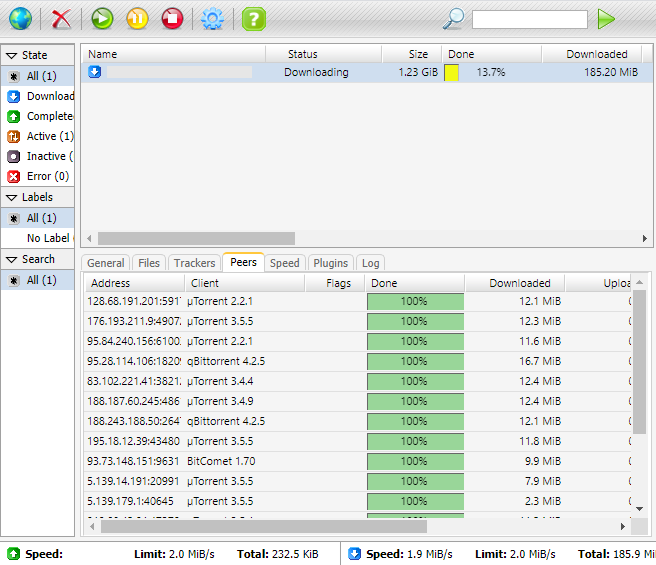
http://192.168.1.1:81/rutorrent/adresinden gidin, yapılandırın ve nasıl çalıştığını kontrol edin: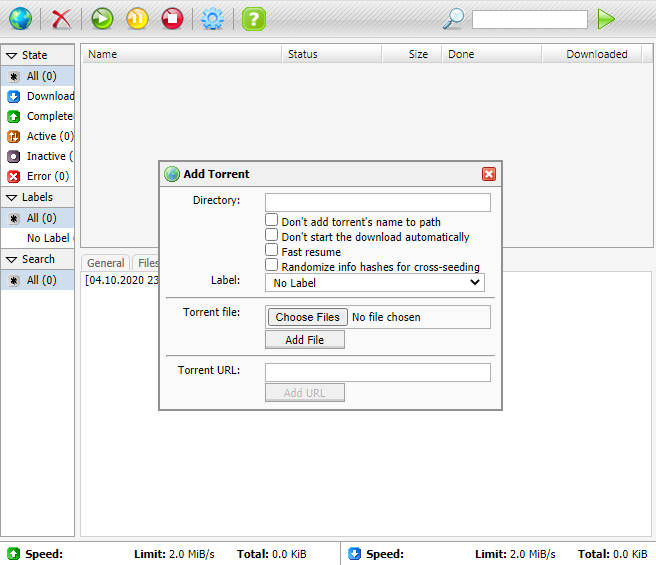
Önemli
Paket desteği, geliştiricilerin rTorrent - BitTorrent istemcisi forum başlığında sağlanmaktadır.