Herkese Açık Bir VPN Sağlayıcısına OpenVPN Bağlantısı
OpenVPN, VPN bağlantıları için en popüler protokollerden biridir. Sanal bir özel ağ oluşturmak veya yerel ağları birbirine bağlamak için kullanılabilir. OpenVPN açık kaynaklıdır ve GNU GPL lisansı altında ücretsiz olarak dağıtılır. Diğer VPN protokollerine göre daha yüksek bağlantı hızları sağlar. Ayrıca, OpenVPN en güvenli protokollerden biri olarak adlandırılabilir. Aktarılan tüm veriler, OpenSSL şifreleme kütüphanesi ve SSLv3/TLSv1 protokolleri tarafından güvenli bir şekilde korunur, bu da yüksek güvenlik ve anonimlik sağlar.
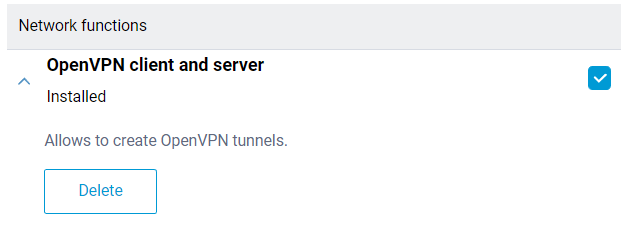
OpenVPN istemci ve sunucu desteği Keenetic Router'lara entegre edilmiştir. Bir OpenVPN bağlantısını yapılandırmak için 'OpenVPN istemci ve sunucu' sistem bileşenini kurmak gerekir. Bir Keenetic Router, bu bileşenle hem istemci hem de bir OpenVPN sunucusu olarak kullanılabilir. Sunucu modunun ayrıntılı bir açıklaması 'OpenVPN sunucusu' makalesinde bulunabilir. Sistem bileşenini, 'Genel sistem ayarları' sayfasında, 'Güncellemeler ve bileşen seçenekleri' bölümündeki 'Bileşen seçenekleri'ne tıklayarak kurabilirsiniz.
Önemli
Keenetic Router'lar, sıkı OpenVPN yapılandırma gereksinimleri kullanır. Aşağıda bazı temel gereksinimler yer almaktadır:
Yapılandırma tek bir dosyada olmalıdır.
Sertifikalar, anahtarlar vb. bu dosyaya dahil edilmelidir.
.ovpn uzantılı yapılandırma dosyaları genellikle uyumludur.
İSS, farklı Router'lar veya sistemler için dosyalar sunuyorsa, çoğu durumda OpenWRT için bir dosya kullanabilirsiniz.
Yapılandırmada, yalnızca belgede listelenen seçenekleri kullanmalısınız: https://community.openvpn.net/openvpn/wiki/Openvpn24ManPage
Yapılandırmada, işlenemeyen yönergeler veya bilinmeyen komutlar olmamalıdır.
Yukarıda açıklanan seçeneklerden bazıları desteklenmeyebilir. Örneğin, bizim OpenVPN uygulamamız IPv6 ile ilgili seçenekleri desteklememektedir.
Seçeneklerin, etkinleştirilmiş sertifikaların ve anahtarların sırası önemli değildir.
OpenVPN yapılandırma dosyası,
startup-configyapılandırma dosyasına kaydedilmez. OpenVPN istemci arayüz ayarlarının yedeğini almak için ayrıca kaydetmeniz gerekir.
[en] The number of client connections is limited by the allocated service memory partition size of 24 Kbytes for storing VPN configurations. This is especially important for OpenVPN connections because the total size of their configurations must not exceed 24 Kbytes.
VPN sağlayıcıları, OpenVPN yapılandırmaları için farklı çeşitler sunabilir. Aşağıda bunlardan bazılarını inceleyeceğiz.
Yapılandırma dosyasını, bağlanmayı planladığınız OpenVPN sunucusunun sitesinden indirin.
Örneğin, www.vpngate.net adresinde sunucuyu seçin ve 'OpenVPN Config file' üzerine tıklayın.
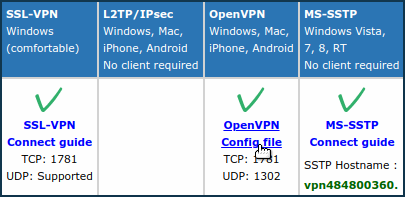
Ardından, bu sunucunun yapılandırmalarından birini, örneğin DDNS alan adına ve
TCP 1781'e sahip olanı seçin.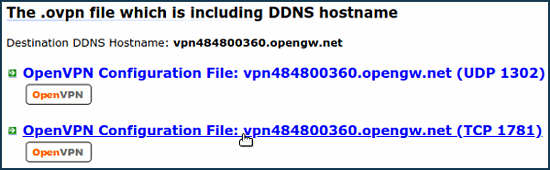
.ovpnuzantılı yapılandırma dosyası bilgisayarınıza indirilecektir. Herhangi bir metin düzenleyicide (ör. Notepad) açın ve klavyedekiCtrl-Ave ardındanCtrl-Ctuşlarına basarak tüm içeriği panoya kopyalayın.Bundan sonra, 'Diğer bağlantılar' sayfasına gidin ve 'VPN Bağlantıları' bölümünde 'Bağlantı oluştur' seçeneğine tıklayın. 'VPN Bağlantı Ayarları' penceresinde, 'Tür (protokol)' alanında 'OpenVPN' seçeneğini seçin.
Ardından 'Bağlantı adı' alanına bağlantının adını girin ve 'OpenVPN yapılandırması' alanına panodan kopyalanan yapılandırmayı
Ctrl-Vtuşuna basarak yapıştırın. Ayarları kaydedin.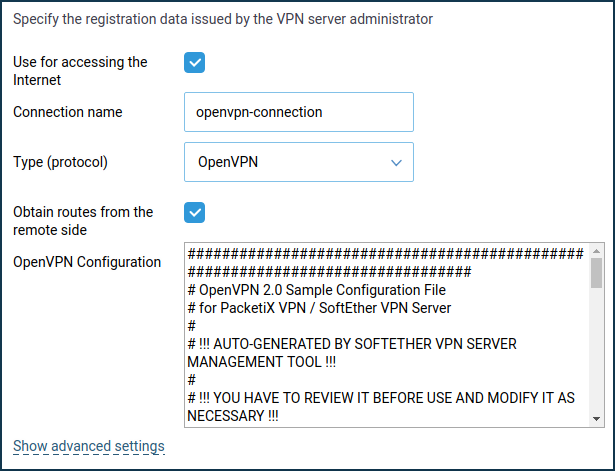
Bir çalışma takvimi kurmak veya bağlantının çalışacağı arayüzü tanımlamak için 'Gelişmiş ayarları göster' seçeneğine tıklayın.
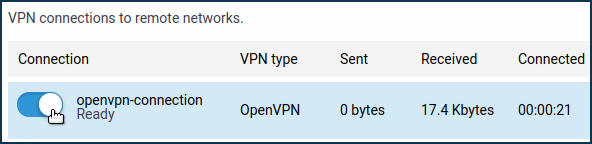
Bağlantı kurulduktan sonra, switch'i 'Açık' durumuna getirin. Bağlantının durumu da bu sayfada görüntülenecektir.
İpucu
Bu bağlantıyı İnternet'e erişmek için kullanmak istiyorsanız, ona en yüksek önceliği atayın. Öncelikler hakkında bilgiyi 'Bağlantı öncelikleri' makalesinde bulabilirsiniz.
OpenVPN ayarlarına sahip bazı sitelerde, yapılandırma dosyasına ek olarak, belirtilen bir
kullanıcı adıveşifrebulunur. Örneğin, vpnbook.com adresinde.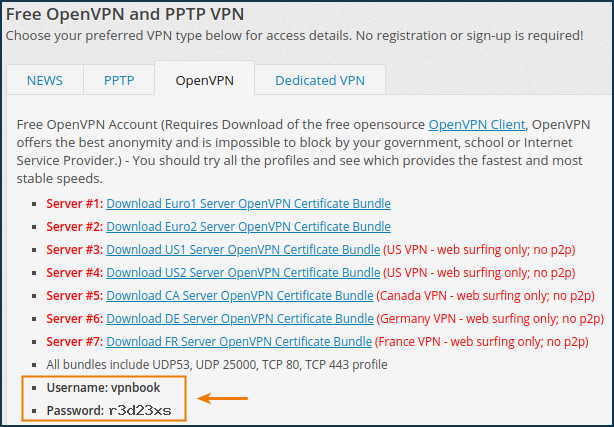
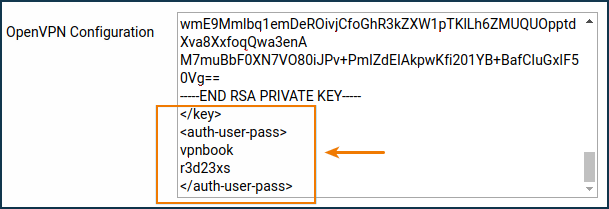
Bu durumda, yapılandırma dosyasındaki içeriği panoya kopyalamadan önce şu satırı silmek gerekir:
auth-user-pass
ve gerekli
kullanıcı adıveşifredeğerlerini girerek bir bölüm ekleyin. Örneğin:<auth-user-pass> vpnbook r3d23xs </auth-user-pass>
altvpn.com gibi diğer İSS'ler, sertifikaları ve anahtarları ayrı dosyalar olarak sağlar. Bu durumda şunları yapmanız gerekir:
Sertifika ve anahtar dosyası adlarını içeren satırları
#simgesiyle yorum satırı yapın:#ca ca.crt #cert xxxxxxxxxxxx.crt #key xxxxxxxxxxxx.crt
Yapılandırma dosyasının sonuna sertifika ve anahtar bölümlerini ekleyin ve ilgili dosyaların içeriklerini yapıştırın:
<ca>
-----BEGIN CERTIFICATE-----
...       <--insert the body of the certificate from the ca.crt
 file here
-----END CERTIFICATE-----
</ca>
<cert>
-----BEGIN CERTIFICATE-----
...       <--insert the body of the certificate from the xxxx.crt
 file here
-----END CERTIFICATE-----
</cert>
<key>
-----BEGIN RSA PRIVATE KEY-----
...       <--insert the key body from the xxxx.key
 file here
-----END RSA PRIVATE KEY-----
</key>
privateinternetaccess.com sağlayıcısının yapılandırmasında
ca.rsa.2048.crtvecrl.rsa.2048.pemdosyaları bulunur; bu dosyaların içerikleri sırasıyla<crl-verify> </crl-verify>ve<ca> </ca>bölümleri arasına eklenmelidir.OpenVPN yapılandırma dosyası şöyle görünecektir:
client
dev tun
proto udp
remote sweden.privateinternetaccess.com 1198
resolv-retry infinite
nobind
persist-key
persist-tun
cipher aes-128-cbc
auth sha1
tls-client
remote-cert-tls server
<auth-user-pass>
xxxxxx       <--insert your login here
xxxxxx       <--insert your password here
</auth-user-pass>
comp-lzo
verb 1
reneg-sec 0
disable-occ

<crl-verify>
-----BEGIN X509 CRL-----
...       <--insert the key body from the crl.rsa.2048.pem file here
-----END X509 CRL-----
</crl-verify>

<ca>
-----BEGIN CERTIFICATE-----
...       <--insert the body of the certificate from the file ca.rsa.2048.crt here
-----END CERTIFICATE-----
</ca>
[en] Typical errors and solutions:
[en]
auth-user-pass without inline credentials data is not supported[en] The configuration file contains a line for online login/password entry, which Keenetic does not support. Error in the Keenetic log file:
OpenVPN0 auth-user-pass without inline credentials data is not supported
OpenVPN0 Exiting due to fatal error
[en] Delete or comment out all lines of this kind:
[en]
auth-user-pass[en]
Block-outside-dnsoption error[en] The
block-outside-dnsoption is configured on the OpenVPN server, which is correctly handled only in Windows. Error in the Keenetic log file:OpenVPN0 Unrecognized option or missing or extra parameter(s) in configuration: (line X): block-outside-dns (2.4.4) OpenVPN0 Exiting due to fatal error
[en] Add a line to the OpenVPN client configuration file:
[en]
pull-filter ignore "block-outside-dns"[en] Error when connecting to PrivateTunnel servers
[en] An error is displayed when trying to connect:
OpenVPN0 Unrecognized option or missing or extra parameter(s) in configuration: (line 3): client-ip (2.4.4)
[en] Add a line to the OpenVPN client configuration file:
[en]
ignore-unknown-option client-ip block-ipv6[en] An error occurs when using the askpass
/storage/key.txtoption:Error: private key password verification failed
[en] This is a limitation of the current OpenVPN implementation in Keenetic. You can only use a key without a password or with a fixed password: '
password'.[en] After updating the router to KeeneticOS
3.9.1, the VPN tunnel to the OpenVPN servers for certain VPN suppliers may no longer be established. You can see the following messages in the system log:W [Dec 15 16:52:58] OpenVPN6: DEPRECATED OPTION: --cipher set to 'AES-128-CBC' but missing in --data-ciphers (AES-256-GCM:AES-128-GCM:CHACHA20-POLY1305). OpenVPN ignores --cipher for cipher negotiations. Error: private key password verification failed
[en] The problem is the outdated encryption format BF-CBC, which is not supported starting from the OpenVPN
2.5.0client version ( KeeneticOS3.9uses the OpenVPN2.6.0client version).Not
[en] The
BF-CBCchipher is no longer supported in the default configuration. The OpenVPN2.5.0version supportsAES-256-GCMandAES-128-GCMciphers by default. You can change this behaviour using thedata-ciphersoption, for example, by specifying in the settingsdata-ciphers AES-256-GCM:AES-128-GCM:BF-CBC. To support very old OpenVPN nodes that do not support cipher negotiation (mode "--cipher"), you can specifydata-ciphers-fallback BF-CBC.[en] When upgrading to a new version of OpenVPN, the setting "
cipher BF-CBC" in older configuration files will be converted with appendingBF-CBCto thedata-ciphersset. In addition, thedata-ciphers-fallbackmode is turned on.[en] To successfully install the tunnel, you will need to change the directive:
[en]
cipher AES-128-CBCtodata-ciphers AES-128-CBCordata-ciphers AES-256-GCM:AES-128-GCM:CHACHA20-POLY1305[en] If it doesn't work, then change the directive:
[en]
cipher AES-128-CBCtodata-ciphers-fallback AES-128-CBC[en] For maximum cipher negotiation compatibility with the remote server, specify the following directives:
[en]
data-ciphers AES-256-GCM:AES-128-GCM:CHACHA20-POLY1305[en]
data-ciphers-fallback AES-128-CBC[en] or
[en]
data-ciphers AES-256-GCM:AES-128-GCM:CHACHA20-POLY1305[en]
data-ciphers-fallback AES-256-CBCÖnemli
[en] Encryption depends on the remote OpenVPN server. Before changing the directive
cipher, please look at the system log.[en] If the following key size error is recorded in the log:
[E] Dec 16 19:01:38 OpenVPN0: Unrecognized option or missing or extra parameter(s) in configuration: (line 22): keysize (2.6_git)
[E] Dec 16 19:01:38 OpenVPN0: Exiting due to fatal error
[E] Dec 16 19:01:38 ndm: Service: "OpenVPN0": unexpectedly stopped.Error: private key password verification failed
[en] Then in the tunnel configuration, you need to remove the
keysize 256option directive, which is outdated for the updated client OpenVPN2.6.0, and check the tunnel connection again.[en] You can find detailed information for the "
keysize" option by this link.
Aşağıdaki bilgileri okumanızı öneririz: