Linux'tan bir WireGuard VPN'e Bağlanma
KeeneticOS 3,3 sürümünden itibaren, Keenetic Router'ın yerel ağına uzaktan bağlanmak için bir WireGuard VPN tüneli kullanmak mümkündür.
Önemli
Keenetic cihazınızı bir VPN sunucusu olarak kurmayı planlıyorsanız, bir genel IP adresine sahip olduğundan ve KeenDNS kullanıyorsanız, yine genel bir IP adresi gerektiren Doğrudan erişim modunda çalıştığından emin olun. Bu koşullardan herhangi biri karşılanmazsa, böyle bir sunucuya İnternet üzerinden bağlanamazsınız.
Öncelikle Keenetic cihaz üzerinde WireGuard sunucusunu yapılandırmanız gerekir. Aşağıdaki talimat bu süreci gösterir: İki Keenetic Router arasında WireGuard VPN yapılandırma. Ardından VPN istemci kurulumuna geçin.
Burada, bir Linux işletim sisteminden VPN sunucusuna, Ubuntu 18.04 LTS'de bağlantıyı kurmak için CLI (terminal) ve Linux Mint 19.3 LTS dağıtımında grafik arayüzü kullanılarak nasıl bağlanılacağına dair bir örnek verilmiştir.
Linux tabanlı bir bilgisayarda bir Keenetic WireGuard sunucusuna bağlantı kurmak için, yerleşik apt paket yöneticisini kullanarak WireGuard paketini yüklemeniz gerekir.
Terminal kullanarak kurulum ve yapılandırma varyantı
Terminali başlatın ve WireGuard'ın terminalde çalışması ve NetworkManager GUI'de (ağ bağlantılarını yönetmek için bir program) bağlantıyı yapılandırması için gereken paketleri yükleyin: uygulama paketi, çekirdek modülü, çekirdek başlık dosyaları.
[my@my-wrk-lnv ~]$
sudo apt install wireguardReading package lists... Done Building dependency tree... Done Reading state information... Done The following additional packages will be installed: wireguard-tools Suggested packages: openresolv | resolvconf The following NEW packages will be installed: wireguard wireguard-tools 0 upgraded, 2 newly installed, 0 to remove and 0 not upgraded. Need to get 90,0 kB of archives. After this operation, 344 kB of additional disk space will be used. Do you want to continue? [Y/n] y Get:1 http://mirrors.daticum.com/ubuntu impish/universe amd64 wireguard-tools amd64 1.0.20210424-1ubuntu1 [86,9 kB] Get:2 http://mirrors.daticum.com/ubuntu impish/universe amd64 wireguard all 1.0.20210424-1ubuntu1 [3 126 B] Fetched 90,0 kB in 0s (1 181 kB/s) Selecting previously unselected package wireguard-tools. (Reading database ... 234329 files and directories currently installed.) Preparing to unpack .../wireguard-tools_1.0.20210424-1ubuntu1_amd64.deb ... Unpacking wireguard-tools (1.0.20210424-1ubuntu1) ... Selecting previously unselected package wireguard. Preparing to unpack .../wireguard_1.0.20210424-1ubuntu1_all.deb ... Unpacking wireguard (1.0.20210424-1ubuntu1) ... Setting up wireguard-tools (1.0.20210424-1ubuntu1) ... wg-quick.target is a disabled or a static unit not running, not starting it. Setting up wireguard (1.0.20210424-1ubuntu1) ... Processing triggers for man-db (2.9.4-2) ...Bir Özel Anahtar ve bir Genel Anahtar oluşturun:
[my@my-wrk-lnv ~]$
cd /etc/wireguard/[my@my-wrk-lnv wireguard]$umask 077[my@my-wrk-lnv wireguard]$sudo -i[sudo] password for my: root@my-wrk-lnv:~#cd /etc/wireguard/root@my-wrk-lnv:/etc/wireguard#wg genkey > private-keyroot@my-wrk-lnv:/etc/wireguard#wg pubkey > public-key < private-keyroot@my-wrk-lnv:~#exit[my@my-wrk-lnv wireguard]$sudo cat private-keyAOSXWm+sXxRuu/Uo8lysE4PIwVZTRDD+YV6w3HicGHg= [my@my-wrk-lnv wireguard]$sudo cat public-keyxxKBcZlhZlbjW7yFuhZ08l294HBAp2I/iM05YE8vs0Y= [my@my-wrk-lnv wireguard]$cd -[my@my-wrk-lnv ~]$Önemli
cd /etc/wireguard/yazdıktan sonraPermission denied(İzin reddedildi) sonucunu alırsanız, dizini okumak için root erişiminiz yoktur.[my@my-wrk-lnv ~]$
cd /etc/wireguard/bash: cd: /etc/wireguard/:Permission deniedDizine root erişim hakları olmadan erişebilen kullanıcıyı değiştirin:
[my@my-wrk-lnv ~]$
sudo chown -R my /etc/wireguard/[my@my-wrk-lnv ~]$cd /etc/wireguard[my@my-wrk-lnvwireguard]$Bağlantıyı yapılandırdıktan sonra, varsayılan dizine erişim için sahibi geri değiştirebilirsiniz:
[my@my-wrk-lnv wireguard]$
cd - /home/my[my@my-wrk-lnv ~]$sudo chown -R root /etc/wireguard/wg-client.confyapılandırma dosyasını oluşturun:[my@my-wrk-lnv wireguard]$
sudo touch wg-client.conf[my@my-wrk-lnv wireguard]$ls -1private-key public-keywg-client.confÖrneğin nano gibi bir metin düzenleyiciyle dosyayı açarak oluşturulan
wg-client.confyapılandırma dosyasına bağlantı ayarlarını ekleyelim:[my@my-wrk-lnv wireguard]$
sudo nano wg-client.conf[sudo] password for my: [Interface] PrivateKey = AOSXWm+sXxRuu/Uo8lysE4PIwVZTRDD+YV6w3HicGHg= Address = 172.16.82.5/24 DNS = [Peer] PublicKey = 1YVx+x3C817V9YdhUtpUhzyDLVj5tnK2m//WjFGynm4= AllowedIPs = 172.16.82.1/32, 192.168.22.0/24 Endpoint = wgwrkserver.dynns.com:16631 PersistentKeepalive = 5İstemcinin [Interface] Arayüzünü Yapılandırma:
İstemci arayüzünün PrivateKey alanına, 2. adımda oluşturulan özel anahtarı girin.
Anahtar,
catkomutuyla görüntülenebilir:[my@my-wrk-lnv wireguard]$
sudo cat private-keyAOSXWm+sXxRuu/Uo8lysE4PIwVZTRDD+YV6w3HicGHg=İstemci arayüzünün 'Addresses' (Adresler) alanında, IP adresini IP/bitmask (IP/bit maskesi) formatında belirtin —
172.16.82.5/24(bu, tünelin dahili adresidir). Başka bir alt ağ kullanılabilir, ancak bu alt ağ özel bir adres aralığından seçilmeli ve bu cihazlarda yapılandırılan diğer alt ağlarla çakışmaktan kaçınılmalıdır.Önemli
İstemcinin [Interface] (Arayüz) tarafında yapılandırılmış bir WireGuard VPN tüneli üzerinden İnternet erişiminiz varsa, DNS = alanında DNS sunucusunu belirtmelisiniz.
Örneğimizde, Google'ın DNS sunucusunun adresi
8.8.8.8'dir:[Interface] PrivateKey =AOSXWm+sXxRuu/Uo8lysE4PIwVZTRDD+YV6w3HicGHg= Address = 172.16.82.5/24 DNS = 8.8.8.8 [Peer] PublicKey = 1YVx+x3C817V9YdhUtpUhzyDLVj5tnK2m//WjFGynm4= AllowedIPs = 172.16.82.1/32, 192.168.22.0/24 Endpoint = enpwgwrkserver.dynns.com:16631 PersistentKeepalive = 5
Sunucunun [Peer] (Eş) Yapılandırması:
Public key (Genel anahtar) alanına, Router'ın web arayüzündeki WireGuard ayarlarından panoya kopyalanabilen sunucunun genel anahtarını yapıştırın:
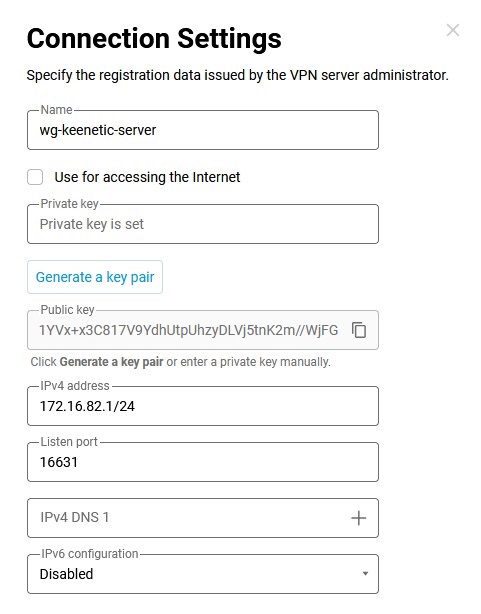
AllowedIPs (İzin Verilen IP'ler) alanına, IP/bitmask (IP/bit maskesi) formatında izin verilen IP adreslerini girin —
172.16.82.1/32(dahili sunucu adresi) ve192.168.22.0/24(Keenetic Router'ın yerel segmentinin adresi).Endpoint (Uç Nokta) alanına, WireGuard sunucusunun genel IP adresini veya alan adını ve WireGuard istemcisinin iletişim kuracağı dinleme portunu girin.
PersistentKeepalive alanına, bağlantının uzak tarafının kullanılabilirliğini kontrol etme denemelerinin sıklığını girin. Genellikle, kontroller arasında
3-5saniyelik bir aralık yeterlidir.Daha önce yapılandırılmış WireGuard sunucusunun tarafında bir uzak bağlantı kurun.
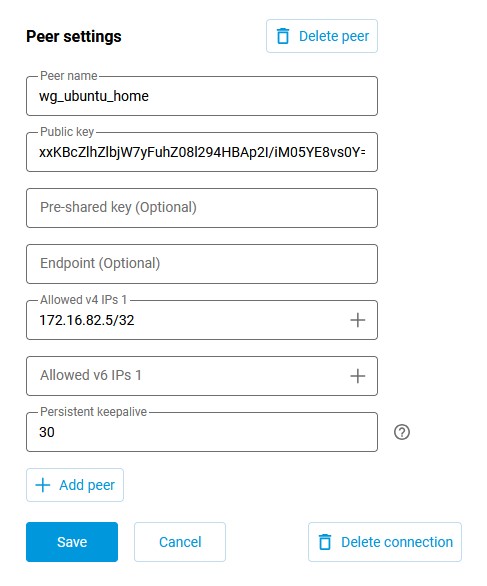
Router'ın web arayüzüne bağlanın ve İnternet bölümündeki Diğer bağlantılar sayfasına gidin. Daha önce oluşturulmuş WireGuard bağlantısına (
wg-keenetic-server) tıklayın ve eşin ayarlarını ekleyin. Eş ayarları penceresini açmak için Eş ekle'ye tıklayın, bu pencerede tünel adınıwg-ubuntu-homeolarak belirtin.Public key (Genel anahtar) alanına, 2. adımda oluşturulan anahtarı girin.
Hatırlatma olarak, anahtar
catkomutuyla görüntülenebilir:[my@my-wrk-lnv wireguard]$
sudo cat public-keyxxKBcZlhZlbjW7yFuhZ08l294HBAp2I/iM05YE8vs0Y=Allowed v4 IPs (İzin Verilen v4 IP'leri) alanında, sunucuya trafiğe izin verilecek adresi IP/bitmask (IP/bit maskesi) formatında belirtin —
172.16.82.5/32Persistent keepalive (Kalıcı keepalive) alanında, bağlantının uzak tarafının kullanılabilirliğini kontrol etme denemelerinin sıklığını belirtmelisiniz. Genellikle, kontroller arasında
10-15saniyelik bir aralık yeterlidir. Keenetic eş ayarlarındaki Persistent keepalive (Kalıcı keepalive) varsayılan değeri30saniyedir.Kaydet'e tıklayın.
Linux sistem arka plan programlarını başlatmanıza ve yönetmenize olanak tanıyan Systemd başlatma sistemi aracılığıyla İşletim Sistemi başlangıcında otomatik bir WireGuard bağlantısı oluşturun:
[my@my-wrk-lnv ~]$
sudo systemctl enable wg-quick@wg-client.serviceCreated symlink /etc/systemd/system/multi-user.target.wants/wg-quick@wg-client.service → /lib/systemd/system/wg-quick@.service.Önemli
***.servicehizmet adınawg-client.confyapılandırma adını girinWireGuard bağlantısını başlatın:
[my@my-wrk-lnv ~]$
sudo systemctl start wg-quick@wg-client.serviceÖnemli
Hizmet başlamazsa,
systemctl status wg-quick@wg-client.serviceveyajournalctl -xekomutuyla önyükleme günlüğünü kontrol etmelisiniz:[my@my-wrk-lnv ~]$
systemctl status wg-quick@wg-client.servicewg-quick@wg-client.service - WireGuard via wg-quick(8) for wg/client Loaded: loaded (/lib/systemd/system/wg-quick@.service; indirect; vendor preset: enabled) Active: failed (Result: exit-code) since Wed 2020-04-22 19:55:59 MSK; 8s ago Docs: man:wg-quick(8)\ man:wg(8) https://www.wireguard.com/ https://www.wireguard.com/quickstart/ https://git.zx2c4.com/wireguard-tools/about/src/man/wg-quick.8 https://git.zx2c4.com/wireguard-tools/about/src/man/wg.8 Process: 8734 ExecStart=/usr/bin/wg-quick up wg-client (code=exited, status=127) Main PID: 8734 (code=exited, status=127) apr 22 19:55:59 my@my-wrk-lnv wg-quick[8734]: [#] ip link add wg-client type wireguard apr 22 19:55:59 my@my-wrk-lnv wg-quick[8734]: [#] wg setconf wg-client /dev/fd/63 apr 22 19:55:59 my@my-wrk-lnv wg-quick[8734]: [#] ip -4 address add 172.16.82.20/24 dev wg-client apr 22 19:55:59 my@my-wrk-lnv wg-quick[8734]: [#] ip link set mtu 1420 up dev wg-client apr 22 19:55:59 my@my-wrk-lnv wg-quick[8734]: [#] resolvconf -a wg-client -m 0 -xapr 22 19:55:59 my@my-wrk-lnv wg-quick[8734]: /usr/bin/wg-quick: line 31: resolvconf: command not foundapr 22 19:55:59 my@my-wrk-lnv wg-quick[8734]: [#] ip link delete dev wg-client apr 22 19:55:59 my@my-wrk-lnv systemd[1]: wg-quick@wg-client.service: Main process exited, code=exited, status=127/n/a apr 22 19:55:59 my@my-wrk-lnv systemd[1]: wg-quick@wg-client.service: Failed with result 'exit-code'. apr 22 19:55:59 my@my-wrk-lnv systemd[1]: Failed to start WireGuard via wg-quick(8) for wg/client.Hataya göre,
wg-quickiçin gerekli olanresolvconfpaketi yüklü değil, paketi yükleyin:[my@my-wrk-lnv ~]$
sudo apt install resolvconfReading package lists... Done Building dependency tree... Done Reading state information... Done The following NEW packages will be installed: resolvconf 0 upgraded, 1 newly installed, 0 to remove and 3 not upgraded. Need to get 54,7 kB of archives. After this operation, 203 kB of additional disk space will be used. Get:1 http://mirrors.daticum.com/ubuntu impish/universe amd64 resolvconf all 1.84ubuntu1 [54,7 kB] Fetched 54,7 kB in 0s (888 kB/s) Preconfiguring packages ... Selecting previously unselected package resolvconf. (Reading database ... 234409 files and directories currently installed.) Preparing to unpack .../resolvconf_1.84ubuntu1_all.deb ... Unpacking resolvconf (1.84ubuntu1) ... Setting up resolvconf (1.84ubuntu1) ... Created symlink /etc/systemd/system/sysinit.target.wants/resolvconf.service → /lib/systemd/system/resolvconf.service. Created symlink /etc/systemd/system/systemd-resolved.service.wants/resolvconf-pull-resolved.path → /lib/systemd/system/resolvconf-pull-resolved.path. Created symlink /etc/systemd/system/systemd-resolved.service.wants/resolvconf-pu ll-resolved.service → /lib/systemd/system/resolvconf-pull-resolved.service. Processing triggers for ureadahead (0.100.0-21) ... Processing triggers for man-db (2.9.4-2) ... Processing triggers for resolvconf (1.84ubuntu1) ...Paket yüklendikten sonra, hizmetin çalıştığını kontrol edin. Bağlantıyı kontrol etme:
[my@my-wrk-lnv ~]$
sudo wginterface: wg-client public key: xxKBcZlhZlbjW7yFuhZ08l294HBAp2I/iM05YE8vs0Y= private key: (hidden) listening port: 45757 peer: 1YVx+x3C817V9YdhUtpUhzyDLVj5tnK2m//WjFGynm4= endpoint: 193.0.174.159:16631 allowed ips: 172.16.82.1/32, 192.168.22.0/24 transfer: 0 B received, 148 B sent persistent keepalive: every 5 secondsSunucunun kullanılabilirliğini kontrol etmek için IP adresine ICMP paketleri gönderebilirsiniz:
[my@my-wrk-lnv ~]$
ping -c 10 -s 100 192.168.22.1PING 192.168.22.1 (192.168.22.1) 100(128) bytes of data. 108 bytes from 192.168.22.1: icmp_seq=1 ttl=64 time=6.76 ms 108 bytes from 192.168.22.1: icmp_seq=2 ttl=64 time=6.70 ms 108 bytes from 192.168.22.1: icmp_seq=3 ttl=64 time=6.63 ms 108 bytes from 192.168.22.1: icmp_seq=4 ttl=64 time=6.84 ms 108 bytes from 192.168.22.1: icmp_seq=5 ttl=64 time=6.57 ms 108 bytes from 192.168.22.1: icmp_seq=6 ttl=64 time=6.24 ms 108 bytes from 192.168.22.1: icmp_seq=7 ttl=64 time=9.92 ms 108 bytes from 192.168.22.1: icmp_seq=8 ttl=64 time=9.75 ms 108 bytes from 192.168.22.1: icmp_seq=9 ttl=64 time=5.77 ms 108 bytes from 192.168.22.1: icmp_seq=10 ttl=64 time=7.03 ms --- 192.168.22.1 ping statistics --- 10 packets transmitted, 10 received, 0% packet loss, time 9014ms rtt min/avg/max/mdev = 5.778/7.225/9.920/1.349 msWireGuard bağlantısının işletim sistemi başlangıcında Systemd başlatma sistemi aracılığıyla otomatik olarak başlamasını devre dışı bırakmak için aşağıdaki komutu girin:
[my@my-wrk-lnv ~]$
sudo systemctl disable wg-quick@wg-client.serviceRemoved /etc/systemd/system/multi-user.target.wants/wg-quick@wg-client.serviceWireGuard bağlantısını durdurmak için aşağıdaki komutu girin:
[my@my-wrk-lnv ~]$
sudo systemctl stop wg-quick@wg-client.serviceKurulum tamamlandı.
NetworkManager kullanarak kurulum ve yapılandırma varyantı
NetworkManager GUI, ağ bağlantısı yönetimi yazılımı için bir grafik arayüzüdür.
Kısa komut dizisi:
git clone https://github.com/max-moser/network-manager-wireguardcd network-manager-wireguard./autogen.sh --without-libnm-glib./configure --without-libnm-glib --prefix=/usr --sysconfdir=/etc --libdir=/usr/lib/x86_64-linux-gnu --libexecdir=/usr/lib/NetworkManager --localstatedir=/varmakesudo make install
Önemli
Eklenti kurulumu başarıyla tamamlanmazsa veya eklentiyi kurmak için yeterli paket yoksa, şunu çalıştırın:
sudo apt install wireguard git dh-autoreconf libglib2.0-dev intltool build-essential libgtk-3-dev libnma-dev libsecret-1-dev network-manager-dev resolvconf
Ayrıntılı komut dizisi:
Eklenti kodunu Github deposundan klonlayın:
[my@my-wrk-lnv ~]$
git clone https://github.com/max-moser/network-manager-wireguardCloning into 'network-manager-wireguard'... remote: Enumerating objects: 534, done. remote: Total 534 (delta 0), reused 0 (delta 0), pack-reused 534 Receiving objects: 100% (534/534), 748.44 KiB | 1.63 MiB/s, done. Resolving deltas: 100% (317/317), done.network-manager-wireguarddizinine gidin ve Wireguard tünelinin grafiksel yapılandırması için eklentiyi derleyin:[my@my-wrk-lnv ~]$
cd network-manager-wireguard[my@my-wrk-lnv network-manager-wireguard](master)$./autogen.sh --without-libnm-gliblibtoolize: putting auxiliary files in '.'. libtoolize: linking file './ltmain.sh' libtoolize: putting macros in AC_CONFIG_MACRO_DIRS, 'm4'. libtoolize: linking file 'm4/libtool.m4' libtoolize: linking file 'm4/ltoptions.m4' libtoolize: linking file 'm4/ltsugar.m4' libtoolize: linking file 'm4/ltversion.m4' libtoolize: linking file 'm4/lt~obsolete.m4' configure.ac:19: installing './compile' configure.ac:19: installing './config.guess' configure.ac:19: installing './config.sub' configure.ac:7: installing './install-sh' configure.ac:7: installing './missing' Makefile.am: installing './depcomp' parallel-tests: installing './test-driver' checking for a BSD-compatible install... /usr/bin/install -c checking whether build environment is sane... yes checking for a thread-safe mkdir -p... /bin/mkdir -p checking for gawk... gawk checking whether make sets $(MAKE)... yes checking whether make supports nested variables... yes checking whether UID '1000' is supported by ustar format... yes checking whether GID '1000' is supported by ustar format... yes checking how to create a ustar tar archive... gnutar checking whether to enable maintainer-specific portions of Makefiles... yes checking whether make supports nested variables... (cached) yes checking for gcc-ar... gcc-ar checking for gcc-ranlib... gcc-ranlib checking build system type... x86_64-pc-linux-gnu checking host system type... x86_64-pc-linux-gnu checking how to print strings... printf checking for style of include used by make... GNU checking for gcc... gcc checking whether the C compiler works... yes checking for C compiler default output file name... a.out checking for suffix of executables... checking whether we are cross compiling... no checking for suffix of object files... o checking whether we are using the GNU C compiler... yes checking whether gcc accepts -g... yes checking for gcc option to accept ISO C89... none needed checking whether gcc understands -c and -o together... yes checking dependency style of gcc... gcc3 checking for a sed that does not truncate output... /bin/sed checking for grep that handles long lines and -e... /bin/grep checking for egrep... /bin/grep -E checking for fgrep... /bin/grep -F checking for ld used by gcc... /usr/bin/ld checking if the linker (/usr/bin/ld) is GNU ld... yes checking for BSD- or MS-compatible name lister (nm)... /usr/bin/nm -B checking the name lister (/usr/bin/nm -B) interface... BSD nm checking whether ln -s works... yes checking the maximum length of command line arguments... 1572864 checking how to convert x86_64-pc-linux-gnu file names to x86_64-pc-linux-gnu format... func_convert_file_noop checking how to convert x86_64-pc-linux-gnu file names to toolchain format... func_convert_file_noop checking for /usr/bin/ld option to reload object files... -r checking for objdump... objdump checking how to recognize dependent libraries... pass_all checking for dlltool... no checking how to associate runtime and link libraries... printf %s\n checking for archiver @FILE support... @ checking for strip... strip checking for ranlib... (cached) gcc-ranlib checking command to parse /usr/bin/nm -B output from gcc object... ok checking for sysroot... no checking for a working dd... /bin/dd checking how to truncate binary pipes... /bin/dd bs=4096 count=1 checking for mt... mt checking if mt is a manifest tool... no checking how to run the C preprocessor... gcc -E checking for ANSI C header files... yes checking for sys/types.h... yes checking for sys/stat.h... yes checking for stdlib.h... yes checking for string.h... yes checking for memory.h... yes checking for strings.h... yes checking for inttypes.h... yes checking for stdint.h... yes checking for unistd.h... yes checking for dlfcn.h... yes checking for objdir... .libs checking if gcc supports -fno-rtti -fno-exceptions... no checking for gcc option to produce PIC... -fPIC -DPIC checking if gcc PIC flag -fPIC -DPIC works... yes checking if gcc static flag -static works... yes checking if gcc supports -c -o file.o... yes checking if gcc supports -c -o file.o... (cached) yes checking whether the gcc linker (/usr/bin/ld -m elf_x86_64) supports shared libraries... yes checking whether -lc should be explicitly linked in... no checking dynamic linker characteristics... GNU/Linux ld.so checking how to hardcode library paths into programs... immediate checking whether stripping libraries is possible... yes checking if libtool supports shared libraries... yes checking whether to build shared libraries... yes checking whether to build static libraries... no checking for gcc... (cached) gcc checking whether we are using the GNU C compiler... (cached) yes checking whether gcc accepts -g... (cached) yes checking for gcc option to accept ISO C89... (cached) none needed checking whether gcc understands -c and -o together... (cached) yes checking dependency style of gcc... (cached) gcc3 checking for glib-compile-resources... /usr/bin/glib-compile-resources checking for ANSI C header files... (cached) yes checking fcntl.h usability... yes checking fcntl.h presence... yes checking for fcntl.h... yes checking paths.h usability... yes checking paths.h presence... yes checking for paths.h... yes checking sys/ioctl.h usability... yes checking sys/ioctl.h presence... yes checking for sys/ioctl.h... yes checking sys/time.h usability... yes checking sys/time.h presence... yes checking for sys/time.h... yes checking syslog.h usability... yes checking syslog.h presence... yes checking for syslog.h... yes checking for unistd.h... (cached) yes checking for mode_t... yes checking for pid_t... yes checking whether time.h and sys/time.h may both be included... yes checking whether gcc needs -traditional... no checking for working memcmp... yes checking for select... yes checking for socket... yes checking for uname... yes checking for library containing dlopen... -ldl checking whether NLS is requested... yes checking for intltool >= 0.35... 0.51.0 found checking for intltool-update... /usr/bin/intltool-update checking for intltool-merge... /usr/bin/intltool-merge checking for intltool-extract... /usr/bin/intltool-extract checking for xgettext... /usr/bin/xgettext checking for msgmerge... /usr/bin/msgmerge checking for msgfmt... /usr/bin/msgfmt checking for gmsgfmt... /usr/bin/msgfmt checking for perl... /usr/bin/perl checking for perl >= 5.8.1... 5.26.1 checking for XML::Parser... ok checking locale.h usability... yes checking locale.h presence... yes checking for locale.h... yes checking for LC_MESSAGES... yes checking for CFPreferencesCopyAppValue... no checking for CFLocaleCopyCurrent... no checking libintl.h usability... yes checking libintl.h presence... yes checking for libintl.h... yes checking for ngettext in libc... yes checking for dgettext in libc... yes checking for bind_textdomain_codeset... yes checking for msgfmt... (cached) /usr/bin/msgfmt checking for dcgettext... yes checking if msgfmt accepts -c... yes checking for gmsgfmt... (cached) /usr/bin/msgfmt checking for xgettext... (cached) /usr/bin/xgettext checking for pkg-config... /usr/bin/pkg-config checking pkg-config is at least version 0.9.0... yes checking for GLIB... yes checking for GTK... yes checking for LIBNMA... yes checking for LIBSECRET... yes checking for LIBNM... yes checking for more warnings... yes checking whether -Wunknown-warning-option works as expected... not supported checking whether "-Wextra" works as expected... yes checking whether "-Wdeclaration-after-statement" works as expected... yes checking whether "-Wfloat-equal" works as expected... yes checking whether "-Wformat-nonliteral" works as expected... yes checking whether "-Wformat-security" works as expected... yes checking whether "-Wimplicit-fallthrough" works as expected... yes checking whether "-Wimplicit-function-declaration" works as expected... yes checking whether "-Winit-self" works as expected... yes checking whether "-Wlogical-op" works as expected... yes checking whether "-Wmissing-declarations" works as expected... yes checking whether "-Wmissing-include-dirs" works as expected... yes checking whether "-Wmissing-prototypes" works as expected... yes checking whether "-Wpointer-arith" works as expected... yes checking whether "-Wshadow" works as expected... yes checking whether "-Wshift-negative-value" works as expected... yes checking whether "-Wstrict-prototypes" works as expected... yes checking whether "-Wundef" works as expected... yes checking whether "-Wno-duplicate-decl-specifier" works as expected... yes checking whether "-Wno-format-truncation" works as expected... yes checking whether "-Wno-format-y2k" works as expected... yes checking whether "-Wno-missing-field-initializers" works as expected... yes checking whether "-Wno-pragmas" works as expected... yes checking whether "-Wno-sign-compare" works as expected... yes checking whether "-Wno-unused-but-set-variable" works as expected... yes checking whether "-Wno-unused-parameter" works as expected... yes checking whether -Wunknown-attributes works as expected... not supported checking whether -Wtypedef-redefinition works as expected... not supported checking whether -Warray-bounds works as expected... yes checking whether -Wparentheses-equality works as expected... not supported checking whether -Wunused-value works as expected... yes checking whether -Wmissing-braces works as expected... no checking if gcc supports flag -fdata-sections -ffunction-sections -Wl,--gc-sections in envvar CFLAGS... yes checking that generated files are newer than configure... done configure: creating ./config.status config.status: creating Makefile config.status: creating po/Makefile.in config.status: creating config.h config.status: executing depfiles commands config.status: executing libtool commands config.status: executing default-1 commands config.status: executing po/stamp-it commands Build configuration: --with-gnome=yes --with-libnm-glib=no --enable-absolute-paths=no --enable-more-warnings=yes --enable-lto=no --enable-ld-gc=yes[my@my-wrk-lnv network-manager-wireguard](master)$
./configure --without-libnm-glib --prefix=/usr --sysconfdir=/etc --libdir=/usr/lib/x86_64-linux-gnu --libexecdir=/usr/lib/NetworkManager --localstatedir=/varchecking for a BSD-compatible install... /usr/bin/install -c checking whether build environment is sane... yes checking for a thread-safe mkdir -p... /bin/mkdir -p checking for gawk... gawk checking whether make sets $(MAKE)... yes checking whether make supports nested variables... yes checking whether UID '1000' is supported by ustar format... yes checking whether GID '1000' is supported by ustar format... yes checking how to create a ustar tar archive... gnutar checking whether to enable maintainer-specific portions of Makefiles... no checking whether make supports nested variables... (cached) yes checking for gcc-ar... gcc-ar checking for gcc-ranlib... gcc-ranlib checking build system type... x86_64-pc-linux-gnu checking host system type... x86_64-pc-linux-gnu checking how to print strings... printf checking for style of include used by make... GNU checking for gcc... gcc checking whether the C compiler works... yes checking for C compiler default output file name... a.out checking for suffix of executables... checking whether we are cross compiling... no checking for suffix of object files... o checking whether we are using the GNU C compiler... yes checking whether gcc accepts -g... yes checking for gcc option to accept ISO C89... none needed checking whether gcc understands -c and -o together... yes checking dependency style of gcc... gcc3 checking for a sed that does not truncate output... /bin/sed checking for grep that handles long lines and -e... /bin/grep checking for egrep... /bin/grep -E checking for fgrep... /bin/grep -F checking for ld used by gcc... /usr/bin/ld checking if the linker (/usr/bin/ld) is GNU ld... yes checking for BSD- or MS-compatible name lister (nm)... /usr/bin/nm -B checking the name lister (/usr/bin/nm -B) interface... BSD nm checking whether ln -s works... yes checking the maximum length of command line arguments... 1572864 checking how to convert x86_64-pc-linux-gnu file names to x86_64-pc-linux-gnu format... func_convert_file_noop checking how to convert x86_64-pc-linux-gnu file names to toolchain format... func_convert_file_noop checking for /usr/bin/ld option to reload object files... -r checking for objdump... objdump checking how to recognize dependent libraries... pass_all checking for dlltool... no checking how to associate runtime and link libraries... printf %s\n checking for archiver @FILE support... @ checking for strip... strip checking for ranlib... (cached) gcc-ranlib checking command to parse /usr/bin/nm -B output from gcc object... ok checking for sysroot... no checking for a working dd... /bin/dd checking how to truncate binary pipes... /bin/dd bs=4096 count=1 checking for mt... mt checking if mt is a manifest tool... no checking how to run the C preprocessor... gcc -E checking for ANSI C header files... yes checking for sys/types.h... yes checking for sys/stat.h... yes checking for stdlib.h... yes checking for string.h... yes checking for memory.h... yes checking for strings.h... yes checking for inttypes.h... yes checking for stdint.h... yes checking for unistd.h... yes checking for dlfcn.h... yes checking for objdir... .libs checking if gcc supports -fno-rtti -fno-exceptions... no checking for gcc option to produce PIC... -fPIC -DPIC checking if gcc PIC flag -fPIC -DPIC works... yes checking if gcc static flag -static works... yes checking if gcc supports -c -o file.o... yes checking if gcc supports -c -o file.o... (cached) yes checking whether the gcc linker (/usr/bin/ld -m elf_x86_64) supports shared libraries... yes checking whether -lc should be explicitly linked in... no checking dynamic linker characteristics... GNU/Linux ld.so checking how to hardcode library paths into programs... immediate checking whether stripping libraries is possible... yes checking if libtool supports shared libraries... yes checking whether to build shared libraries... yes checking whether to build static libraries... no checking for gcc... (cached) gcc checking whether we are using the GNU C compiler... (cached) yes checking whether gcc accepts -g... (cached) yes checking for gcc option to accept ISO C89... (cached) none needed checking whether gcc understands -c and -o together... (cached) yes checking dependency style of gcc... (cached) gcc3 checking for glib-compile-resources... /usr/bin/glib-compile-resources checking for ANSI C header files... (cached) yes checking fcntl.h usability... yes checking fcntl.h presence... yes checking for fcntl.h... yes checking paths.h usability... yes checking paths.h presence... yes checking for paths.h... yes checking sys/ioctl.h usability... yes checking sys/ioctl.h presence... yes checking for sys/ioctl.h... yes checking sys/time.h usability... yes checking sys/time.h presence... yes checking for sys/time.h... yes checking syslog.h usability... yes checking syslog.h presence... yes checking for syslog.h... yes checking for unistd.h... (cached) yes checking for mode_t... yes checking for pid_t... yes checking whether time.h and sys/time.h may both be included... yes checking whether gcc needs -traditional... no checking for working memcmp... yes checking for select... yes checking for socket... yes checking for uname... yes checking for library containing dlopen... -ldl checking whether NLS is requested... yes checking for intltool >= 0.35... 0.51.0 found checking for intltool-update... /usr/bin/intltool-update checking for intltool-merge... /usr/bin/intltool-merge checking for intltool-extract... /usr/bin/intltool-extract checking for xgettext... /usr/bin/xgettext checking for msgmerge... /usr/bin/msgmerge checking for msgfmt... /usr/bin/msgfmt checking for gmsgfmt... /usr/bin/msgfmt checking for perl... /usr/bin/perl checking for perl >= 5.8.1... 5.26.1 checking for XML::Parser... ok checking locale.h usability... yes checking locale.h presence... yes checking for locale.h... yes checking for LC_MESSAGES... yes checking for CFPreferencesCopyAppValue... no checking for CFLocaleCopyCurrent... no checking libintl.h usability... yes checking libintl.h presence... yes checking for libintl.h... yes checking for ngettext in libc... yes checking for dgettext in libc... yes checking for bind_textdomain_codeset... yes checking for msgfmt... (cached) /usr/bin/msgfmt checking for dcgettext... yes checking if msgfmt accepts -c... yes checking for gmsgfmt... (cached) /usr/bin/msgfmt checking for xgettext... (cached) /usr/bin/xgettext checking for pkg-config... /usr/bin/pkg-config checking pkg-config is at least version 0.9.0... yes checking for GLIB... yes checking for GTK... yes checking for LIBNMA... yes checking for LIBSECRET... yes checking for LIBNM... yes checking for more warnings... yes checking whether -Wunknown-warning-option works as expected... not supported checking whether "-Wextra" works as expected... yes checking whether "-Wdeclaration-after-statement" works as expected... yes checking whether "-Wfloat-equal" works as expected... yes checking whether "-Wformat-nonliteral" works as expected... yes checking whether "-Wformat-security" works as expected... yes checking whether "-Wimplicit-fallthrough" works as expected... yes checking whether "-Wimplicit-function-declaration" works as expected... yes checking whether "-Winit-self" works as expected... yes checking whether "-Wlogical-op" works as expected... yes checking whether "-Wmissing-declarations" works as expected... yes checking whether "-Wmissing-include-dirs" works as expected... yes checking whether "-Wmissing-prototypes" works as expected... yes checking whether "-Wpointer-arith" works as expected... yes checking whether "-Wshadow" works as expected... yes checking whether "-Wshift-negative-value" works as expected... yes checking whether "-Wstrict-prototypes" works as expected... yes checking whether "-Wundef" works as expected... yes checking whether "-Wno-duplicate-decl-specifier" works as expected... yes checking whether "-Wno-format-truncation" works as expected... yes checking whether "-Wno-format-y2k" works as expected... yes checking whether "-Wno-missing-field-initializers" works as expected... yes checking whether "-Wno-pragmas" works as expected... yes checking whether "-Wno-sign-compare" works as expected... yes checking whether "-Wno-unused-but-set-variable" works as expected... yes checking whether "-Wno-unused-parameter" works as expected... yes checking whether -Wunknown-attributes works as expected... not supported checking whether -Wtypedef-redefinition works as expected... not supported checking whether -Warray-bounds works as expected... yes checking whether -Wparentheses-equality works as expected... not supported checking whether -Wunused-value works as expected... yes checking whether -Wmissing-braces works as expected... no checking if gcc supports flag -fdata-sections -ffunction-sections -Wl,--gc-sections in envvar CFLAGS... yes checking that generated files are newer than configure... done configure: creating ./config.status config.status: creating Makefile config.status: creating po/Makefile.in config.status: creating config.h config.status: config.h is unchanged config.status: executing depfiles commands config.status: executing libtool commands config.status: executing default-1 commands config.status: executing po/stamp-it commands Build configuration: --with-gnome=yes --with-libnm-glib=no --enable-absolute-paths=no --enable-more-warnings=yes --enable-lto=no --enable-ld-gc=yes[my@my-wrk-lnv network-manager-wireguard](master)$
makeXMLLINT not set and xmllint not found in path; skipping xml preprocessing. make all-recursive make[1]: Entering directory «/home/my/network-manager-wireguard» XMLLINT not set and xmllint not found in path; skipping xml preprocessing. Making all in . make[2]: Entering directory «/home/my/network-manager-wireguard» XMLLINT not set and xmllint not found in path; skipping xml preprocessing. CC shared/nm-utils/src_libnm_utils_la-nm-shared-utils.lo In file included from ./shared/nm-default.h:49:0, from shared/nm-utils/nm-shared-utils.c:22: /usr/include/libnm/nm-version.h:155:30: warning: "NM_VERSION_1_10_14" is not defined, evaluates to 0 [-Wundef] #if NM_VERSION_MAX_ALLOWED < NM_VERSION_1_10_14 ^~~~~~~~~~~~~~~~~~ CC shared/src_libnm_utils_la-utils.lo In file included from shared/nm-default.h:49:0, from shared/utils.c:22: /usr/include/libnm/nm-version.h:155:30: warning: "NM_VERSION_1_10_14" is not defined, evaluates to 0 [-Wundef] #if NM_VERSION_MAX_ALLOWED < NM_VERSION_1_10_14 ^~~~~~~~~~~~~~~~~~ CCLD auth-dialog/nm-wireguard-auth-dialog ITMRG appdata/network-manager-wireguard.metainfo.xml GEN nm-wireguard-service.name make[2]: Leaving directory «/home/my/network-manager-wireguard» Making all in po make[2]: Entering directory «/home/my/network-manager-wireguard/po» MSGFMT de.gmo MSGFMT en_GB.gmo make[2]: Leaving directory «/home/my/network-manager-wireguard/po» make[1]: Leaving directory «/home/my/network-manager-wireguard»[my@my-wrk-lnv network-manager-wireguard](master)$
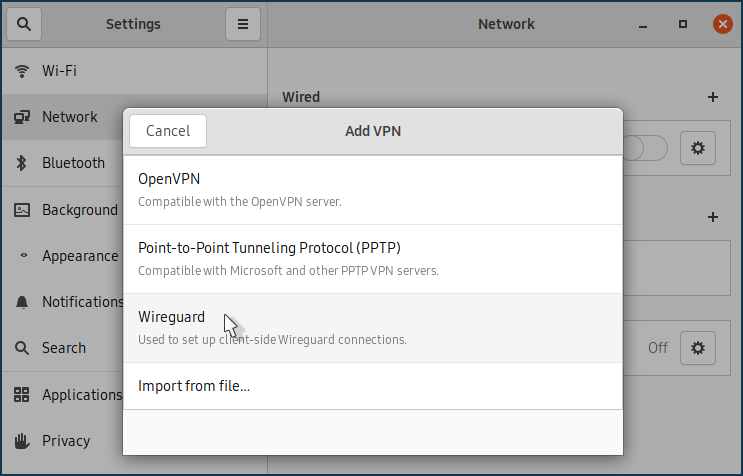
sudo make install[sudo] password for my: XMLLINT not set and xmllint not found in path; skipping xml preprocessing. Making install in . make[1]: Entering directory «/home/my/network-manager-wireguard» >XMLLINT not set and xmllint not found in path; skipping xml preprocessing. make[2]: Entering directory «/home/my/network-manager-wireguard» XMLLINT not set and xmllint not found in path; skipping xml preprocessing. /bin/mkdir -p '/usr/lib/NetworkManager' /bin/bash ./libtool --mode=install /usr/bin/install -c src/nm-wireguard-service auth-dialog/nm-wireguard-auth-dialog '/usr/lib/NetworkManager' libtool: install: /usr/bin/install -c src/nm-wireguard-service /usr/lib/NetworkManager/nm-wireguard-service libtool: install: /usr/bin/install -c auth-dialog/nm-wireguard-auth-dialog /usr/lib/NetworkManager/nm-wireguard-auth-dialog /bin/mkdir -p '/usr/share/appdata' /usr/bin/install -c -m 644 appdata/network-manager-wireguard.metainfo.xml '/usr/share/appdata' /bin/mkdir -p '/etc/dbus-1/system.d' /usr/bin/install -c -m 644 nm-wireguard-service.conf '/etc/dbus-1/system.d' /bin/mkdir -p '/usr/lib/NetworkManager/VPN' /usr/bin/install -c -m 644 nm-wireguard-service.name '/usr/lib/NetworkManager/VPN' /bin/mkdir -p '/usr/lib/x86_64-linux-gnu/NetworkManager' /bin/bash ./libtool --mode=install /usr/bin/install -c properties/libnm-vpn-plugin-wireguard.la properties/libnm-vpn-plugin-wireguard-editor.la '/usr/lib/x86_64-linux-gnu/NetworkManager' libtool: install: /usr/bin/install -c properties/.libs/libnm-vpn-plugin-wireguard.so /usr/lib/x86_64-linux-gnu/NetworkManager/libnm-vpn-plugin-wireguard.so libtool: install: /usr/bin/install -c properties/.libs/libnm-vpn-plugin-wireguard.lai /usr/lib/x86_64-linux-gnu/NetworkManager/libnm-vpn-plugin-wireguard.la libtool: install: /usr/bin/install -c properties/.libs/libnm-vpn-plugin-wireguard-editor.so /usr/lib/x86_64-linux-gnu/NetworkManager/libnm-vpn-plugin-wireguard-editor.so libtool: install: /usr/bin/install -c properties/.libs/libnm-vpn-plugin-wireguard-editor.lai /usr/lib/x86_64-linux-gnu/NetworkManager/libnm-vpn-plugin-wireguard-editor.la libtool: finish: PATH="/usr/local/sbin:/usr/local/bin:/usr/sbin:/usr/bin:/sbin:/bin:/snap/bin:/sbin" ldconfig -n /usr/lib/x86_64-linux-gnu/NetworkManager done installing de.gmo as /usr/share/locale/de/LC_MESSAGES/NetworkManager-wireguard.mo installing en_GB.gmo as /usr/share/locale/en_GB/LC_MESSAGES/NetworkManager-wireguard.mo make[1]: Leaving directory «/home/my/network-manager-wireguard/po»Bilgisayarı Yeniden Başlatın ve Ağ Bağlantıları panelinde Wireguard ayarlarının kullanılabilirliğini kontrol edin:
Wireguard sunucusuna bağlantıyı yapılandırma:
Terminal kullanarak kurulum ve yapılandırma varyantı (2. adım) bölümünde açıklandığı gibi Özel ve Genel anahtarlar oluşturun.
Anahtarlar daha önce sistemde oluşturulmuşsa, bunları terminalde görüntülemeniz ve panoya tek tek kopyalamanız gerekir:
[my@my-wrk-lnv wireguard]$
sudo cat private-key0CwJzxW0yOG4I9XWl9Wo9nzpxen2G0VlTAxD7XEBVmE= [my@my-wrk-lnv wireguard]$sudo cat public-keyM2LeCzN8mFLpa6Xz3BNHFgtNt8kY4wluiwt+NJFTgxk=Özel anahtarı kopyalayın ve tünel ayarlarının Özel Anahtar alanına yapıştırın:
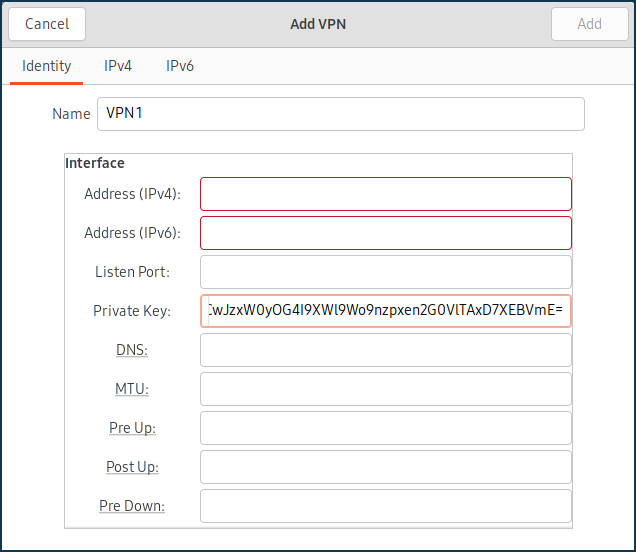
genel anahtarı kopyalayın ve daha önce yapılandırılmış WireGuard sunucusundaki Genel Anahtar alanına yapıştırın.
Allowed v4 IPs (İzin Verilen v4 IP'leri) alanında, sunucuya trafiğin izin verileceği adresi IP/bitmask (IP/bit maskesi) formatında belirtin —
172.16.82.8/32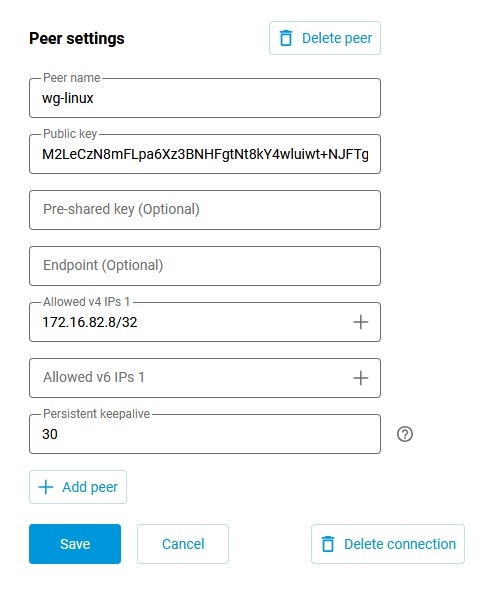
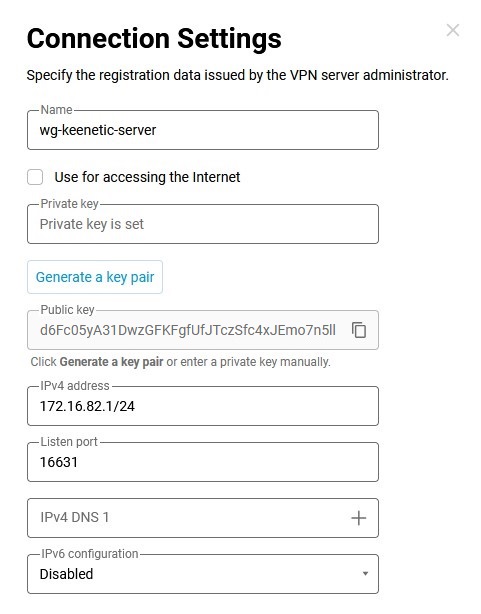
Public Key (Genel Anahtar) alanına, Router'ın web arayüzündeki WireGuard ayarlarından bilgisayarınızın panosuna kopyalanabilen sunucunun genel anahtarını girin:
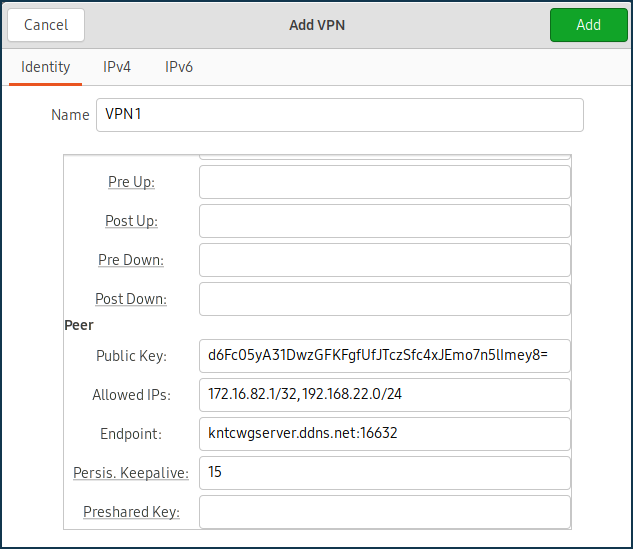
Allowed IPs (İzin Verilen IP'ler) alanında, izin verilen IP adreslerini IP/bitmask (IP/bit maskesi) formatında belirtin —
172.16.82.1/32(dahili sunucu adresi) ve192.168.22.0/24(Keenetic Router'ın yerel segmentinin adresi).Endpoint (Uç Nokta) alanında, WireGuard sunucusunun genel IP adresini veya alan adını ve WireGuard istemcisinin bağlantıyı kuracağı dinleme portunu belirtin.
PersistentKeepalive alanında, bağlantının uzak tarafının kullanılabilirliğini kontrol etme denemelerinin sıklığını belirtin. Genellikle, kontroller arasında
3-5saniyelik bir aralık yeterlidir.IPv4 sekmesinde Rotalar bölümünde, Keenetic Router'ın yerel ağ segmentine bir rota ekleyin:
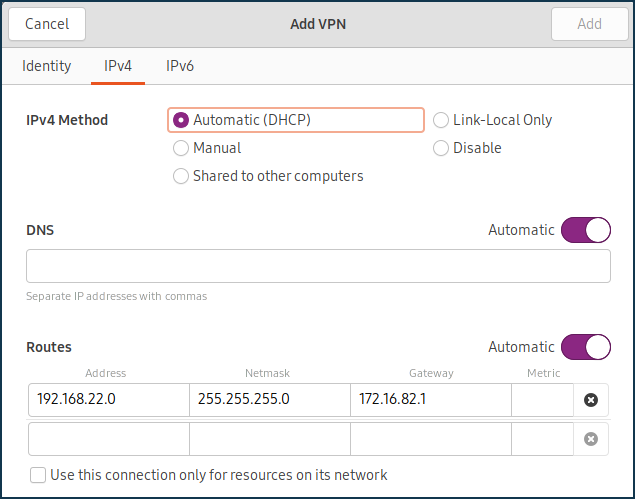
Wireguard sunucusuna bağlanın ve hata mesajı olmadığından emin olun.
Sunucunun kullanılabilirliğini kontrol etmek için, Keenetic Router'ınızın yerel segmentinin IP adresine ICMP paketleri gönderebilirsiniz:
[my@my-wrk-lnv ~]$ ping -c 10 -s 100 192.168.22.1
PING 192.168.22.1 (192.168.22.1) 100(128) bytes of data.
108 bytes from 192.168.22.1: icmp_seq=1 ttl=64 time=5.40 ms
108 bytes from 192.168.22.1: icmp_seq=2 ttl=64 time=6.60 ms
108 bytes from 192.168.22.1: icmp_seq=3 ttl=64 time=7.99 ms
108 bytes from 192.168.22.1: icmp_seq=4 ttl=64 time=7.04 ms
108 bytes from 192.168.22.1: icmp_seq=5 ttl=64 time=6.31 ms
108 bytes from 192.168.22.1: icmp_seq=6 ttl=64 time=7.42 ms
108 bytes from 192.168.22.1: icmp_seq=7 ttl=64 time=6.55 ms
108 bytes from 192.168.22.1: icmp_seq=8 ttl=64 time=7.14 ms
108 bytes from 192.168.22.1: icmp_seq=9 ttl=64 time=8.47 ms
108 bytes from 192.168.22.1: icmp_seq=10 ttl=64 time=7.52 ms
--- 192.168.22.1 ping statistics ---
10 packets transmitted, 10 received, 0% packet loss, time 9015ms
rtt min/avg/max/mdev = 5.402/7.049/8.470/0.834 ms